Top 3 settings for iPhone users: How to protect your package from silent drain while traveling?
Have you ever imagined that you would arrive at the tourist destination that you had always dreamed of, and as soon as you picked up your iPhone to message your family, you were shocked to find that a large portion of your local package had been consumed or had even run out? This common problem is not often caused by your personal Internet browsing, but rather the first culprit is a group of hidden settings in the iOS system that consume data in the background without you noticing. To avoid these surprises, here are 3 critical settings to turn off before your plane takes off:
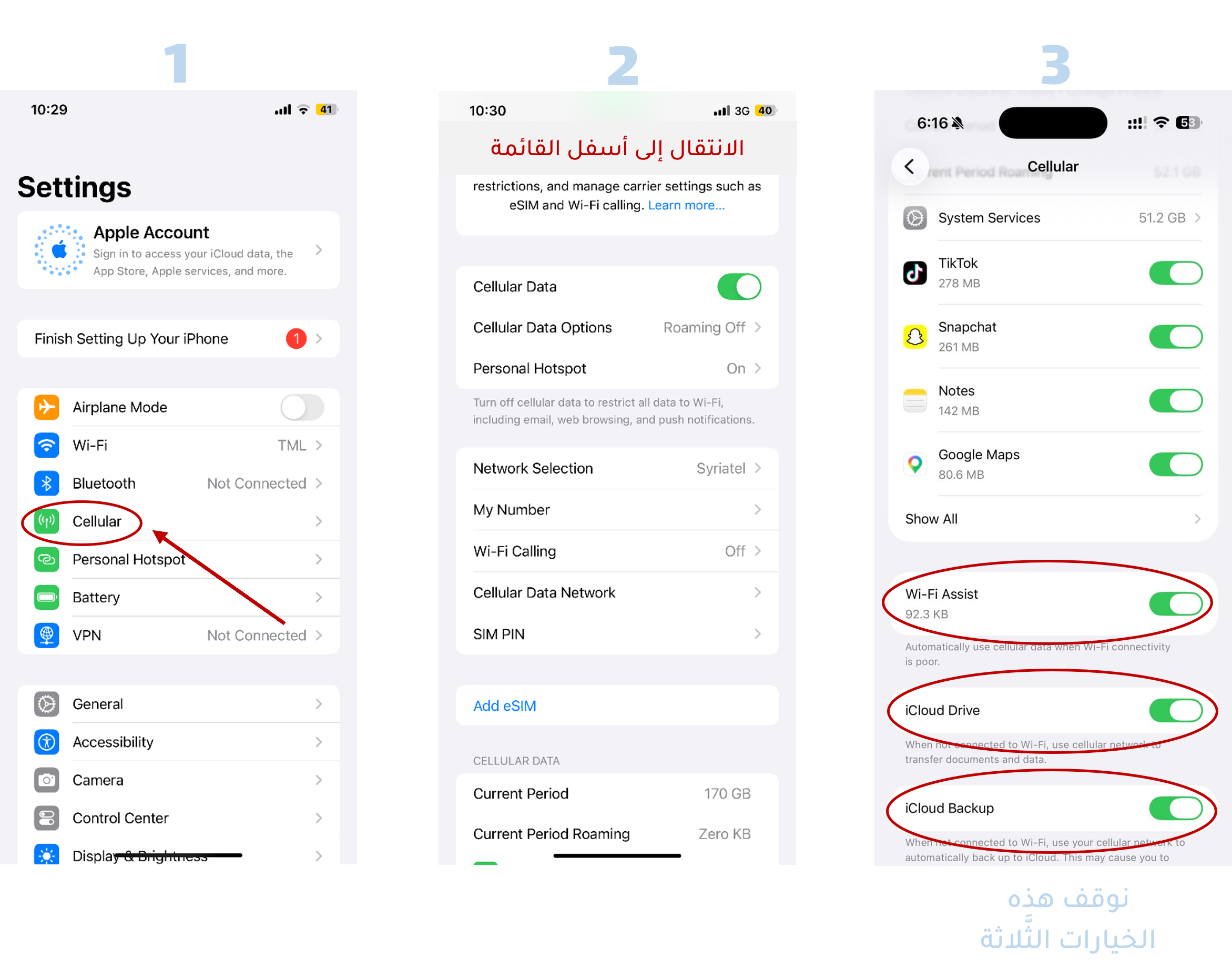
First: Turn off the Network Assistant and Backup feature:
The iPhone's Network Assistant feature is designed to maintain your internet speed; If the Wi-Fi network signal is weak (for example, in a hotel or airport), the phone immediately switches to consuming your SIM data. As for backup, it is to copy your data to the cloud storage and synchronize it in order to ensure the ability to retrieve it in the event of damage or loss of your files.
While you are abroad, these settings will consume a large amount of your internet package and result in significant additional roaming fees.
How to disable it: Open the Settings application, then go to the Cellular section, and scroll the screen to the bottom of the list completely to be able to turn off the Network Assistant and Backup options.
Real-time: Restrict background app refreshes:
Even if your iPhone is locked in your pocket, many applications continue to extract data to update their contents, which drains a large portion of the Internet package.
How to stop: Go to Settings, then choose General, then Background App Update and set it to completely stop or restrict it to wireless networks only.
Bottom line: Instead of constantly worrying or relying on insecure public Wi-Fi networks, switching to a microchip is a smart decision. Through Yellow SIM services, you can activate the internet package that suits your destination in advance. This step gives you internet at local prices and free browsing, while your original SIM card remains active for necessary calls and messages. After adjusting the settings mentioned above, discover our packages and prepare your next trip via the following link: HERE